Sifting through email threads, downloading attachments one by one, sorting them into folders, and hunting down missing replies is exhausting busywork. Attachment Hero packages, organizes, and tracks everything in a single click—giving you hours back each week to invest in high-value work—or simply reclaim your personal downtime.
Every minute spent clicking through replies, downloading files one by one, and organizing folders is time stolen from what truly matters. Attachment Hero gives you that time back—hours every single week that you can reinvest into high-value, profit-generating activities, leisure time with family and personal care, or simply enjoying a far more productive workday with zero administrative drag.
See how Attachment Hero eliminates manual busywork step by step.
Imagine Adam requests proof of insurance from John, Sara, and Jason. Replies start trickling in at different times. Some send multiple emails, some attach files, and some haven't replied at all.
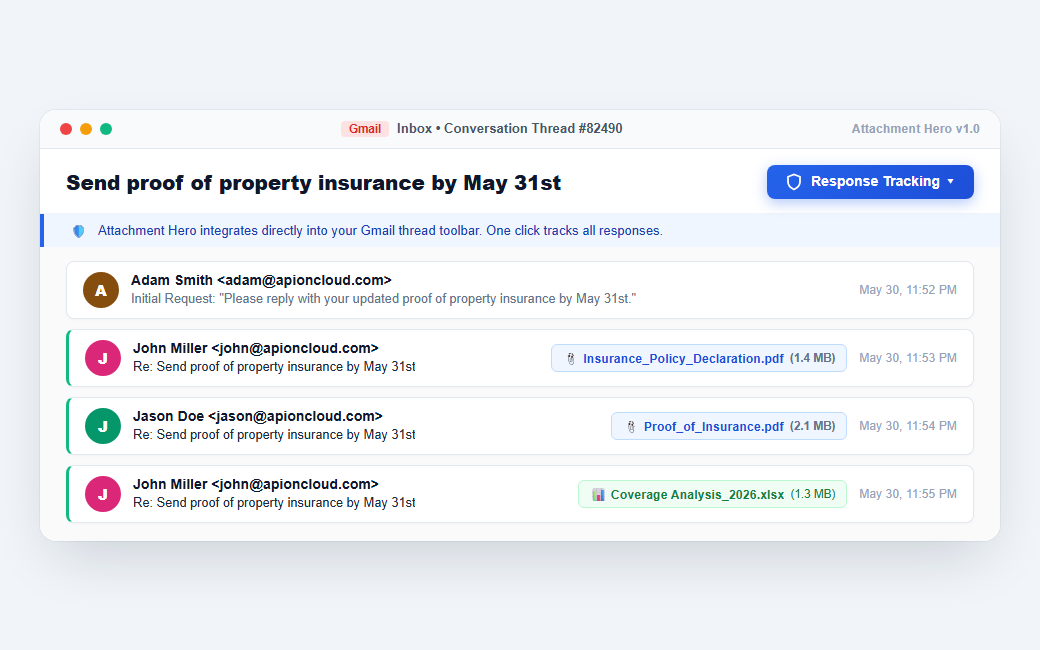
With one click on the Attachment Hub shield in Gmail, Adam gets an instant live dashboard of the thread. He immediately sees who replied, how many emails they sent, and exactly how many files were submitted.
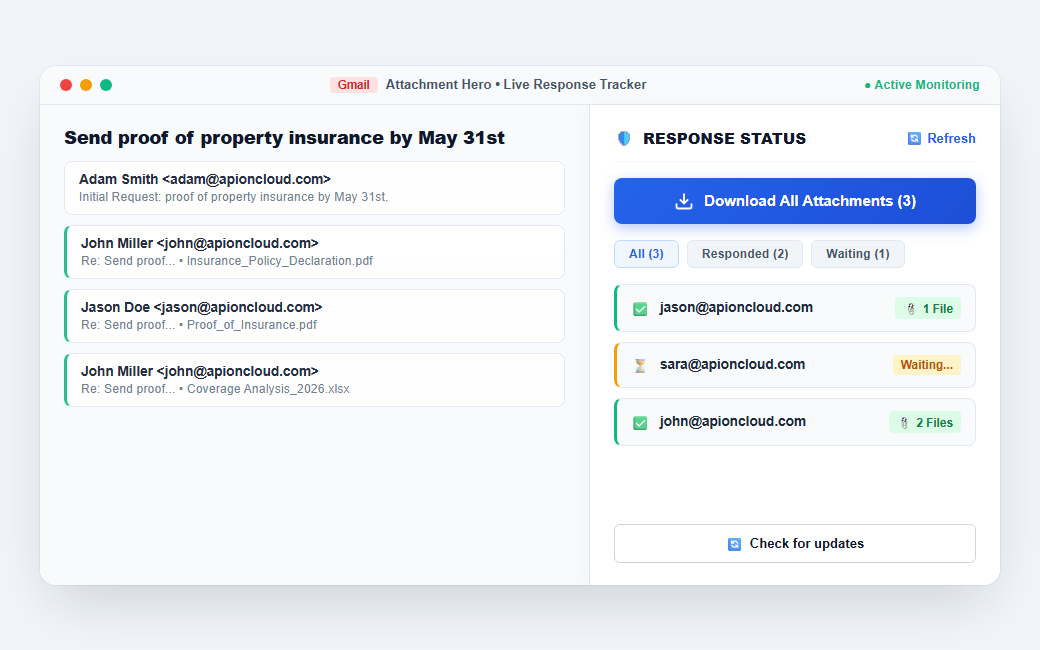
Instead of manually scrolling through each message and downloading individual attachments, Adam simply clicks "Download All Attachments". Attachment Hero packages every file into a single download immediately.
client-zip
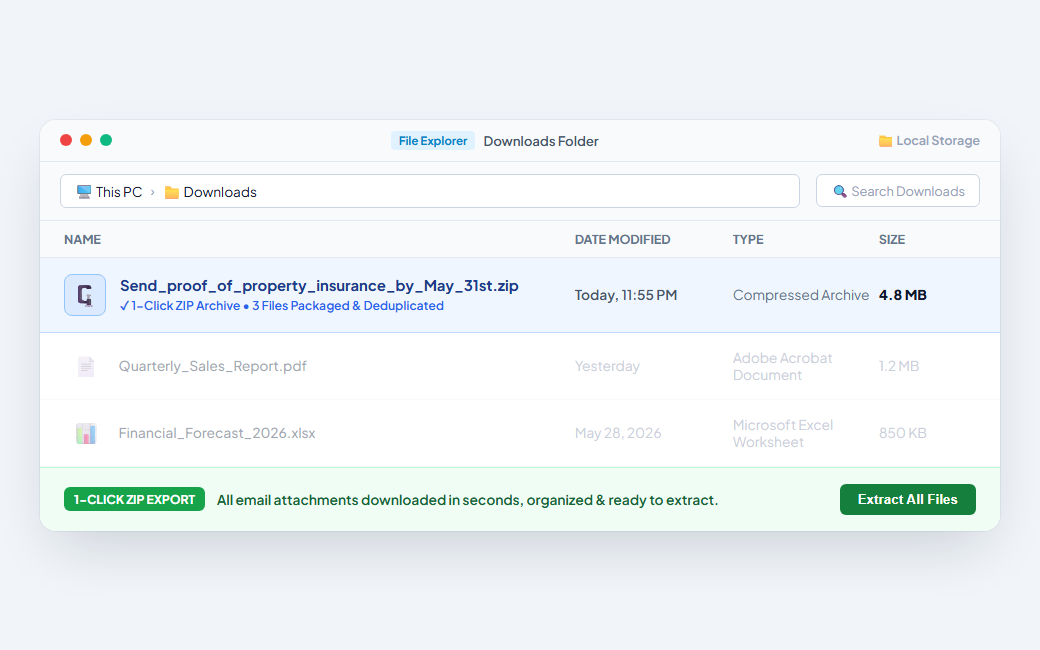
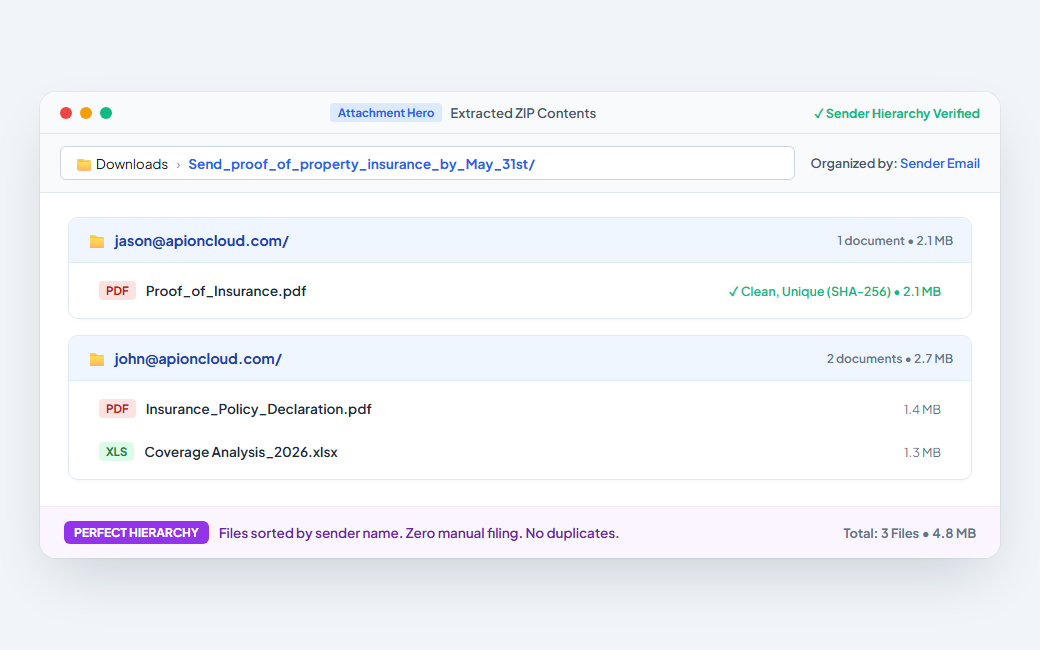
When Adam opens the ZIP file, he finds two clean subfolders: one named after John and one named after Jason. Each folder contains strictly the files that person contributed.
Whether you're drafting an urgent reply, organizing client disclosures, or archiving hundreds of historical documents, Attachment Hero gives you the tools to get it done in seconds.
Ever needed to re-send a contract, price sheet, or photo you received months ago? The old way required searching for the old email, downloading the file to your computer, opening your draft, and dragging it back in.
With Attachment Hero: Click "Attach Recent Files" right from your Gmail compose toolbar. Search by file name or contact, select what you need, and Attachment Hero streams it directly into your draft without ever touching your hard drive or desktop.
Downloads/ folder with
temporary re-sent files
Docs_for_104_Main_St.zip) right from the export window.
Tired of flat ZIP archives where 40 files are dumped together into one giant folder? Attachment Hero introduces structured hierarchy packaging that saves you from sorting files manually.
Each contact gets a dedicated folder containing only their submitted files.
Groups files by company domain—ideal for escrow, lenders, and vendors.
📁 /acme-corp.com/
Organizes attachments cleanly by thread subject or project transaction.
📁 /Deal_Packet_2026/
A powerhouse extension that lives right inside your Gmail tab.
Batch downloads all incoming email attachments across an entire conversation into a clean `.zip` archive, automatically sorted into dedicated subfolders with custom naming options.
Search any historical attachment directly from Gmail's compose window and stream it straight into your active draft—eliminating the need to download and re-upload files.
Side panel dashboard in Gmail showing who replied, who sent attachments, and who is still waiting. Add new participants on the fly with a single refresh.
Hardware-accelerated SHA-256 checksums detect duplicate attachments, quoted reply copies, or re-sent files so you only store clean, unique documents.
Automatically ignores small social icons, tracking pixels, and company logo PNGs (< 5 KB) embedded in email signatures so your downloads aren't cluttered with junk images.
Search across your entire Gmail archive with instant keyword filtering, visual color-coded badges (PDF, XLS, DOC, IMG), and multi-file selection.
Need missing files? Click the Waiting menu to auto-launch a pre-addressed Gmail follow-up drafted strictly to non-responders in one click.
Supports multiple Google accounts (personal and work) inside the same browser profile. Each maintains isolated OAuth credentials via `chrome.identity`.
Whether you want to generate more revenue in your business or reclaim your evenings and weekends with family, Attachment Hero gives you back your hours.
You don't need to run a business to appreciate a tidy inbox. If you deal with attachments when planning events, family reunions, or collecting tax forms, Attachment Hero handles the heavy lifting.
Planning a trip or family gathering? 10 relatives reply across 15 emails with boarding passes, itineraries, and receipts. Downloading them one by one is painful.
Track the thread, see who hasn't sent their travel details yet, and click "Download All" to get a clean ZIP with everyone's photos and tickets neatly sorted.
Every closing involves buyers, sellers, loan officers, appraisers, and inspectors submitting crucial paperwork across convoluted email chains.
Closing is in 48 hours. Did both co-borrowers send their updated W-2s? Missing an attachment delays escrow and creates compliance nightmares.
Side panel immediately shows which party sent their disclosures and who is still missing. One click downloads the complete packet organized by sender into your transaction folder.
During tax season or litigation discovery, professionals receive dozens of scanned PDF statements, bank records, and signed affidavits from multiple parties.
Clients send half their tax documents in January, more in March, and duplicate screenshots in between. Sifting through threads wastes billable hours.
Attachment Hero deduplicates identical PDFs via SHA-256 and exports everything into clean client-labeled subfolders ready for Drake, QuickBooks, or case archives.
Managing hiring pipelines or onboarding rounds involves tracking multiple candidate resumes, portfolios, and references.
5 candidates were asked for references and sample work. Sorting who submitted what requires opening every single email response.
View candidate response status at a glance. Download all candidate portfolios into structured folders named by candidate email address.
Requesting assets, mockups, copy, and vendor estimates from multiple stakeholders across clients and internal teams.
RFP submissions or creative feedback loops result in 30+ email attachments scattered across weeks of threads with overlapping revisions.
Search and export files by file extension or subject. Batch download everything in one organized ZIP, deduplicating unchanged source files automatically.
Get started 100% free with generous everyday limits. Upgrade to Pro when you manage high-volume commercial threads.
Perfect for everyday personal use and light file tracking.
For power users and professionals
* Unlimited Tracking: An Attachment Hero Pro license never limits how many email threads you can track, subject only to your browser's storage limits.
Attachment Hero operates directly on your local device via Gmail. Please note that standard Google account daily download limits continue to apply to your Google account even after purchasing an Attachment Hero Pro license. For typical business documents and PDFs (1–5 MB each), standard daily allowances provide ample capacity for dozens of full ZIP exports daily under normal usage. Google enforces, monitors, and may change these quotas at any time without notice. For the most up-to-date account limits and policies, please consult Google's official Gmail documentation. Read our Quota Guide →
Everything you need to know about Attachment Hero, privacy, and how it handles your emails.
No. Never. Attachment Hero is architected as a 100% client-side Chrome Extension. When you download a ZIP, all file fetching, SHA-256 hash checking, and folder packaging happen inside your local Chrome browser process. We do not have a backend server that receives, scans, or saves your email data.
We only receive your email address when you purchase a Pro license through our payment provider. Your email is used strictly to send your purchase receipt, fulfill your license key, and provide customer support. Free tier users are not required to provide their email address to us.
The Starter version lets you actively track up to 6 email threads concurrently with unlimited ZIP downloads for tracked threads, search your full Gmail attachment history, and includes 10 historical search ZIP exports per month and 10 direct-to-draft file attachments per month, along with automatic sender subfolder organization, duplicate file elimination, and the 1-click follow-up composer. If you need unlimited email thread tracking, unlimited historical ZIP exports, unlimited direct file attaching, or multi-account workflows, upgrading to Pro removes all limits.
Yes. Attachment Hero never places artificial software paywalls or tier caps on the number of email threads you can monitor.
Because Attachment Hero runs 100% privately inside your browser without sending your email data or email metadata to our servers, thread tracking is governed only by your browser's built-in storage. Because Attachment Hero only stores minimal thread info (subject line and recipient emails), practical capacity depends on the size of your recipient lists:
Once a project wraps up, clicking "Stop tracking" on a thread instantly frees up storage for new conversations.
No. No browser extension can bypass Google's account download thresholds. Google enforces daily download quotas across all Gmail accounts. Because typical business documents and PDFs are only 1–5 MB each, everyday users rarely encounter these ceilings under normal usage.
These quotas are set, monitored, and modified independently by Google LLC at any time without notice. We recommend consulting Google's official Gmail documentation for the latest account policies and thresholds.
Attachment Hero includes an intelligent signature filter that analyzes file dimensions and skips small inline images (typically under 5 KB) such as LinkedIn icons, Twitter buttons, and small company branding logos embedded in footers.
Simply click the "Add to Chrome" button. Once installed from the Chrome Web Store, open Gmail, and you will see the Attachment Hero shield icon appear in your top toolbar and inside every email thread.
Every minute spent downloading email attachments one by one is a minute taken away from generating actual revenue in your business or enjoying your personal life. Start saving hours every week with Attachment Hero.
Installs in 30 seconds • No credit card required • Pure client-side privacy

Our official Chrome Web Store listing is launching soon! Enter your email below to get the direct download link or early access notification.